
About
This extension exposes REST APIs as MCP tools. Point it at an OpenAPI spec and get an MCP endpoint.
The extension is local control plane logic that runs inside Envoy: it loads
the OpenAPI spec at config time, generates the MCP tool definitions and the
routing configuration for Envoy's native mcp_json_rest_bridge filter, and
writes them as an ECDS
filesystem file. There is no per-request Go code: Envoy's native filters
serve all MCP traffic.
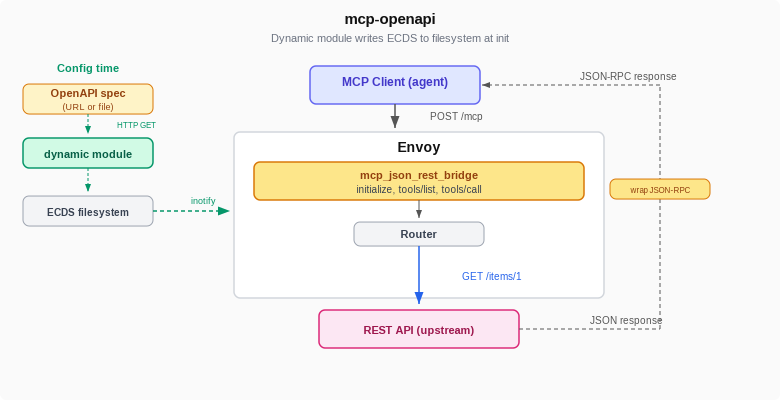
envoy.filters.http.mcpparses MCP JSON-RPC requests.envoy.filters.http.mcp_json_rest_bridgehandlesinitialize,notifications/initializedandtools/listlocally, and transcodestools/callinto REST requests to the upstream.
The ECDS file is written to ./mcp-openapi-bridge.json in the working
directory of the Envoy process. Use the bridge_config_path property to
change it (for example, to run several instances of the extension with
different specs), and update the path_config_source of the
envoy.filters.http.mcp_json_rest_bridge filter to match, for example with
--native-http-filter-after. The file is replaced atomically, so Envoy picks
up configuration changes without a restart.
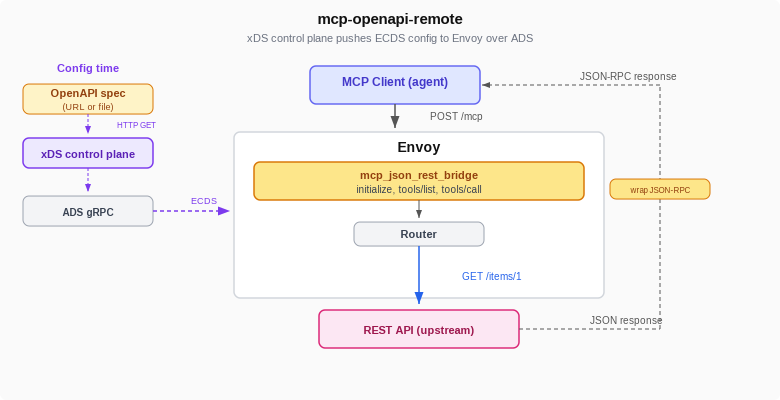
The same conversion logic can also run in an xDS control plane, which pushes the generated configuration to a fleet of Envoy proxies over ADS instead of writing files:
Key Features
- OpenAPI 3.x and Swagger 2.0: In JSON or YAML. Swagger 2.0 specs are automatically up-converted.
- Flexible spec loading: Load the spec inline, from a local file or from an HTTP(S) URL.
- Flat tool schemas: Tool arguments match the bridge's argument model
(e.g.
{"petId": 1}, not{"path": {"petId": 1}}). - LLM-optimized descriptions: The
x-mcp-descriptionvendor extension overrides the operation description and summary. - Tool filtering: Use the
include_opsandexclude_opsproperties to choose which operations are exposed as tools. Operations are identified by theiroperationId, or by a name derived from the HTTP method and path when it is absent (e.g.GET /v1/forecastbecomesget_v1_forecast).
Usage Examples
Petstore MCP server
Expose the Swagger Petstore API as MCP tools, loading the Swagger 2.0 spec from a remote URL.
boe run --extension mcp-openapi \
  --config '{"spec": {"url": "https://petstore.swagger.io/v2/swagger.json"}}' \
  --test-upstream-host petstore.swagger.io

# List the generated tools
curl -s http://localhost:10000/mcp \
  -H 'Content-Type: application/json' \
  -H 'Accept: application/json, text/event-stream' \
  -d '{"jsonrpc": "2.0", "id": 1, "method": "tools/list"}'

# Call a tool
curl -s http://localhost:10000/mcp \
  -H 'Content-Type: application/json' \
  -H 'Accept: application/json, text/event-stream' \
  -d '{"jsonrpc": "2.0", "id": 2, "method": "tools/call",
       "params": {"name": "findPetsByStatus", "arguments": {"status": "available"}}}'
Operation filtering
Only expose a subset of the API operations as MCP tools.
boe run --extension mcp-openapi \
  --config '{
    "spec": {"url": "https://petstore.swagger.io/v2/swagger.json"},
    "include_ops": ["findPetsByStatus", "getPetById"]
  }' \
  --test-upstream-host petstore.swagger.io
Local spec file
Load the spec from a local file. Requests are proxied to the default test upstream (httpbin.org).
cat > /tmp/httpbin.yaml << 'SPEC'
openapi: 3.0.3
info:
  title: HTTPBin
  version: "1.0"
paths:
  /anything/{id}:
    get:
      operationId: getAnything
      parameters:
        - name: id
          in: path
          required: true
          schema:
            type: string
      responses:
        "200":
          description: Echo response
SPEC

boe run --extension mcp-openapi --config '{"spec": {"file": "/tmp/httpbin.yaml"}}'

curl -s http://localhost:10000/mcp \
  -H 'Content-Type: application/json' \
  -H 'Accept: application/json, text/event-stream' \
  -d '{"jsonrpc": "2.0", "id": 1, "method": "tools/call",
       "params": {"name": "getAnything", "arguments": {"id": "42"}}}'